

Learning non-Latin languages seems more difficult because you have to learn how to write them on top of memorizing vocabulary and mimicking the pronunciation.
So, it’s true that it needs more practice. That’s why you need to use a language learning app, like Ling, with a finger tracing feature. The Ling finger tracing method helps you write like a native from day one. Let’s see how in this article!
What Is The Ling Finger Tracing Method?
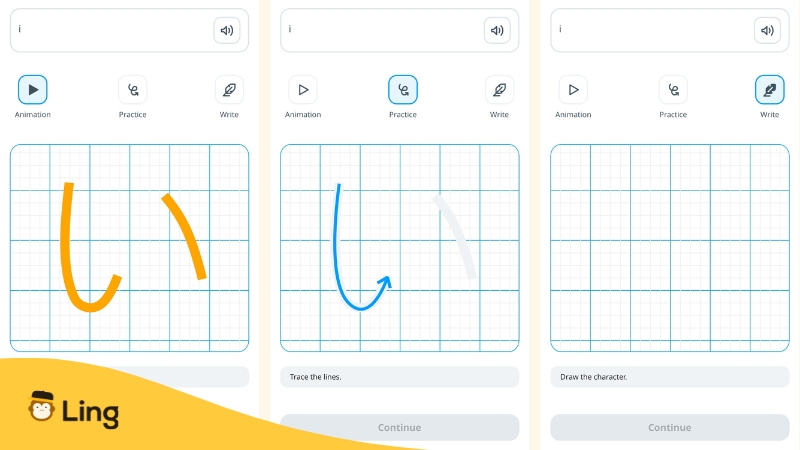
The Ling finger tracing method is an interactive feature that allows you to trace letters directly on your screen using your index finger. Instead of just looking at characters or typing them out (as in many other language apps), you physically follow the strokes just like a child learning to write their native script for the first time.
I want to learn even more languages with Ling!
Download now!
This proposed method mimics the natural way we all learned to write by seeing, feeling, and repeating. It helps you build muscle memory and truly understand how each letter is formed.
Why Writing With Your Finger Is Better Than Typing
One of the most powerful qualities of the Ling app is its focus on active learning. The Ling finger tracing method’s benefit lies in how it taps into our brains’ natural memory processes through movement, repetition, and visual cues.
Muscle Memory Builds Long-Term Retention
When you trace characters with your own finger instead of typing, you’re building kinesthetic memory, also known as muscle memory. This is the same practice that helps you remember how to unlock your phone or type on a keyboard without looking.
By physically tracing the strokes of Thai, Japanese, or Hindi characters, your brain starts associating each shape with a motion. That connection helps the letter stick not just for recognition, but for recall and writing later on.
Visual & Tactile Learning Combined
The Ling finger tracing method combines seeing, touching, and moving, making it far more effective than passively looking at characters or typing them in.
Typing might help with recall, but it skips the tactile and motor connection. Tracing, on the other hand, forces your brain to process each curve and line in a deeper, more embodied way.
That’s why apps that rely only on keyboard inputs, like Duolingo, often fall short for script-based languages; they miss out on the full sensory experience that helps learners write like natives.
How Ling Designed Its Finger Tracing Method For Real Learning
To understand the thought process behind this innovative feature, we spoke with Minh Huyen Ta, the Product Owner at Ling, who leads the team responsible for developing the app’s learning tools.
“We noticed from user reviews that many learners struggled to recognize and write characters in unfamiliar scripts, especially non-Latin ones,” Minh explains.
“The finger tracing feature gives users a simple, interactive way to practice, helping them build confidence and muscle memory right on their phones.”
The goal was to create more than just a typing or matching experience. Ling team wanted users to actively engage with the script, the same way native children do when learning to write. That meant designing a feature that was intuitive, educational, and adaptable across multiple writing systems.
Each writing lesson in the Ling app is built around three intuitive steps:
- Animated Demonstration – Users watch a smooth animation of the correct stroke order.
- Guided Tracing – On-screen lines and arrows guide users as they trace each stroke.
- Freehand Practice – Finally, learners try it themselves, reinforcing the motion and shape.
To ensure clarity and ease of use, the team conducted usability tests with both complete beginners and native speakers. Their priority? Making sure even first-time learners never feel lost.
But building this wasn’t easy.
“Every script is unique,” Minh shares, adding, “Thai, Hindi, Korean, each comes with different rules for stroke order and character variation. We had to manually create the most common character paths for each language to make sure the experience feels natural, accurate, and flexible.”
Before releasing a new writing system, the Ling team works with language experts to break down each character’s strokes, prototypes the tracing path, and gathers user feedback to fine-tune the experience.
And how do they know it’s working?
“We track lesson completion and listen to what users say. When people come back regularly to practice writing and show clear improvement, we know the feature is making a difference.”
Looking ahead, Ling finger tracing method is only going to get better.
“We’re working on adding stroke order correction, gamified writing milestones, and more structured writing tracks,” Minh adds.
“Our goal is to make learning to write not only accurate but also fun, personal, and motivating.”
With thoughtful design and a clear focus on user success, the Ling finger tracing method isn’t just a nice-to-have feature, it’s a game-changing feature for learners who want to write with confidence in any script.
The Languages That Benefit Most From This Feature
If you’ve ever thought, “I just can’t memorize these letters!”, you’re not alone, especially when learning languages with non-Latin scripts. That’s exactly why the Ling finger tracing method exists.
This feature is especially helpful for learners of languages where the writing system is completely unfamiliar or visually complex. Instead of trying to memorize symbols by sight, you physically interact with each letter to build muscle memory as you go.
Currently, Ling offers finger tracing for a wide range of non-Latin script languages, including:
- Thai
- Japanese (Hiragana)
- Hindi (Devanagari)
- Korean (Hangul)
- Arabic
- Burmese
- And more, check the app for the full list!
These are exactly the types of languages that learners often find hardest to write and speak in. The Ling finger tracing method feature turns that challenge into a hands-on experience, making it easier to remember, easier to write, and much more fun.
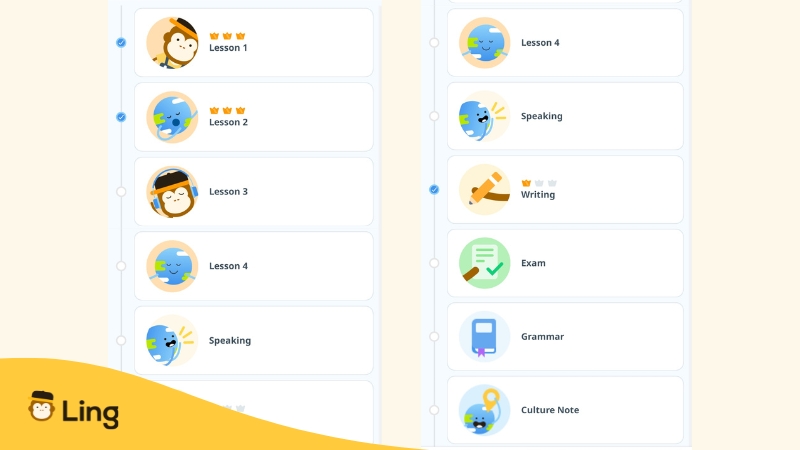
Ling Is One Of The Few Apps That Offer This For Many Languages
Most language learning apps focus heavily on vocabulary, reading, and listening, but they often skip writing, especially when it comes to native scripts. Typing or tapping multiple-choice answers can help with recognition, but it doesn’t teach you how to actually write.
That’s where Ling stands out.
The Ling finger tracing method is available across a wide variety of non-Latin script courses, something very few apps provide. Whether you’re learning Thai, Japanese, Hindi, or Arabic, Ling gives you the tools to practice writing characters just like a native speaker would.
It’s part of Ling’s commitment to full-skill language learning, not just reading and listening, but also writing and speaking. By using the finger tracing method in the core lessons, Ling helps you build confidence in using the language the way it’s really written and spoken.
If your goal is to truly learn the language, not just recognize it, Ling gives you that complete learning experience by focusing on all language skills: vocabulary, reading, writing, and speaking.
Reviews From Ling Users
“I am trying to teach myself Japanese. I really wish I had found this app earlier. The many games are fun. The app is simple to use. I will be purchasing the lifetime subscription in the very near future.
I highly recommend this app.”
-Josh Jackson
“I only have 2 words… Amazing… Extraordinary. I’m only 11 years old and I’m trying to learn Hebrew. I love it. It’s really good and fun. People of all ages can learn here. I love it!“
-Luisa Gabrielle Amorim da Silva
“I have a lot of trouble learning languages and focusing, this is the only app that makes both of these things easy. It feels like a game and is very easy to follow along with in small modules that I do for 5 minutes at the start of each day. It also has a huge list of languages that you won’t find on other apps. Highly recommend!”
-Isaac Shaha
Frequently Asked Questions
1. What Is The Ling Finger Tracing Method?
It’s a feature in the Ling app that lets users trace native script characters with their finger, helping improve writing accuracy and long-term retention through active learning.
2. Why Is Finger Tracing Better Than Typing When Learning A New Script?
Finger tracing engages your muscle memory and visual senses, making it easier to remember how to write letters. It mimics how native speakers learn to write as children by tracing shapes over and over.
3. Which Languages Does Ling Support For Finger Tracing?
Ling currently offers finger tracing for Thai, Japanese, Hindi, Korean, Arabic, Burmese, and other non-Latin script languages. (Check the app for the full list.)
4. Does Finger Tracing Really Help Me Write Like A Native?
Yes! By practicing with your finger, you build the same foundational skills native speakers use, helping you recognize, recall, and write each character with confidence.
Final Thoughts
Learning to write in a new script doesn’t have to be intimidating. With the Ling finger tracing method, you’re not just memorizing letters, you’re engaging your muscle memory, visual processing, and tactile learning all at once.
This science-backed approach helps you write faster, remember better, and build a deeper connection with the language, especially for scripts like Thai, Japanese, Hindi, and more.
Whether you’re a total beginner or brushing up on your skills, the Ling native writing feature supports learners at every level. It’s a smarter, more effective way to master writing, one stroke at a time.
Ready To Write Like a Native?
Ling is one of the few language apps that has a finger tracing feature. If you are learning a language that uses a non-Latin script, like Japanese, Korean, or Thai, learning how to write letters and words from the beginning helps you build a strong core.
Because only learning how to speak the words isn’t enough, and it doesn’t make you really proficient in a foreign language. That’s why Ling’s finger tracing method is one of our key features.
Start learning a language one stroke at a time with Ling! Use our free 7-day trial to test the app, I guarantee that you’ll like it!