

I’m writing this as someone who moved to Thailand, fell in love with the country and with a Thai person, and now sits across a dinner table where his family speaks a language I can barely follow. That’s exactly what makes this Ling app Thai review worth reading.
I’ve been there before. I studied and lived in Korea, and I know exactly what it feels like to be in a room full of people and understand nothing. That particular kind of loneliness doesn’t care how smart you are or how much you want to connect. It just sits there.
So I use the Ling app to learn Thai. Because I need to, and because it works, for what it’s designed to do. This guide covers the full Thai learning experience inside Ling, what it genuinely does well, where it still needs improvement, our users’ feedback, and whether it’s the right fit for your situation.
Learning Thai is more than memorizing words
Explore more →
If you’re looking for an app to learn Thai, and you want to learn more about Ling, keep reading.
Key Findings
- Ling Thai is a structured, gamified language app covering vocabulary, grammar, listening, speaking, writing (Thai script), and cultural context across 200 lessons in 50 units.
- The most common mistake Thai learners make is relying on romanization for too long, Ling builds the Thai script into lessons from day one, but you have to commit to turning romanization off.
- What actually works is the combination of native-speaker audio (both normal and slow speed), speaking practice with real-time feedback, and short daily lessons you can actually stick to.
- Ling’s Thai course is its most developed course, with 164 grammar notes, 35 culture notes, a writing system tracing feature, and the AI Tutor for pronunciation practice.
- Start today: the 7-day free trial on the annual plan gives you full access to everything, so you can try the course before you decide.
Why Thai Is Genuinely Hard (And Why The App You Choose Matters When Learning Thai)
Thai is one of those languages that will humble you fast if you approach it the wrong way. The grammar is actually forgiving: no verb conjugations, no gendered nouns, no plural forms. What makes it hard is the combination of:
- Five tones (where the same syllable means completely different things depending on how you say it)
- 44 consonants and a complex vowel system with its own script
- Essentially zero vocabulary overlap with European languages
I experienced a version of this in Korea. I could study vocabulary lists until 2 a.m. and still blank out the moment a real conversation started. The problem wasn’t effort but that the tools I used didn’t prepare me for how the language actually sounds and moves in real life. Thai has that same potential to frustrate you if you skip the fundamentals.
An effective Thai language app needs to do three things from lesson one:
- Teach tones in context (not just in theory)
- Include the Thai script (not just romanization)
- Build vocabulary through real conversations rather than isolated drills
That’s the lens I’m using here.
What The Ling Thai Learning Journey Actually Looks Like
Day One: Onboarding And First Impressions
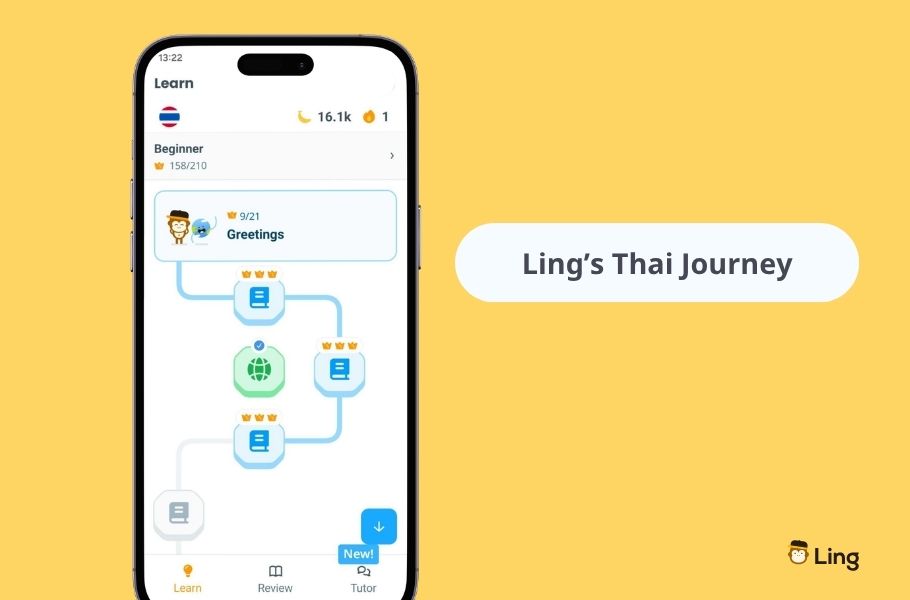
When you download the Ling app and select Thai as your target language, the onboarding survey asks about your motivation, time availability, and current level. The app then sets up a learning plan and drops you at Unit 1: Greetings.
That first unit covers สวัสดี (sa-wat-dee) and the social phrases every Thai interaction starts with. The structure is consistent across all 50 units:
- Four vocabulary lessons
- A speaking lesson
- A writing lesson
- Grammar notes
- Culture notes
- A unit exam
Once you know the rhythm, you stop thinking about the format and just learn in a fun way. What I noticed immediately: the native-speaker audio is the real thing. Not a recording that sounds like someone reading from a script. Every word and phrase is recorded by native Thai speakers at both normal and slow (0.5x) speeds. For tones specifically, where hearing the difference between a falling and a low tone matters enormously, this is not a small detail.
An App That’s Actually Nice To Use
I want to mention something that doesn’t get talked about enough in language app reviews: the design actually matters. If an app is ugly or clunky, I, and a lot of people, will find excuses not to open it. Ling doesn’t have that problem!
- The UI has improved dramatically over the years, and I say that as someone who has watched it evolve from the inside. The characters, animations, and illustrations give the app a lively, warm personality without tipping into chaotic or childish. It’s visually appealing in a way that feels considered: clean layouts, clear navigation, and illustrations that make even a vocabulary drill feel like something you actually want to do. Every age group can use it comfortably, and that’s harder to pull off than it sounds.
- Beyond looks, the user experience keeps getting better. Bugs that used to interrupt lessons mid-session are increasingly rare, our development team ships updates constantly, and a lot of those improvements come directly from user feedback.
- Progress tracking is built into the home screen so you can see your streak, your fluency percentage, and your weekly activity at a glance. That visibility matters more than people would think, and seeing your streak on day 14 or 30 is genuinely motivating.
So all of this, combined with effective gamified lessons, makes Ling a great app for those who want to explore the Thai language.
How Ling Approaches Tones
Let me be specific here, because this question comes up constantly: Does Ling teach Thai tones?
Yes, but not through a dedicated tones module or a game specifically designed around tone patterns. What Ling does is embed tone practice into the core lesson structure:
- The native audio in every lesson models correct tones in context.
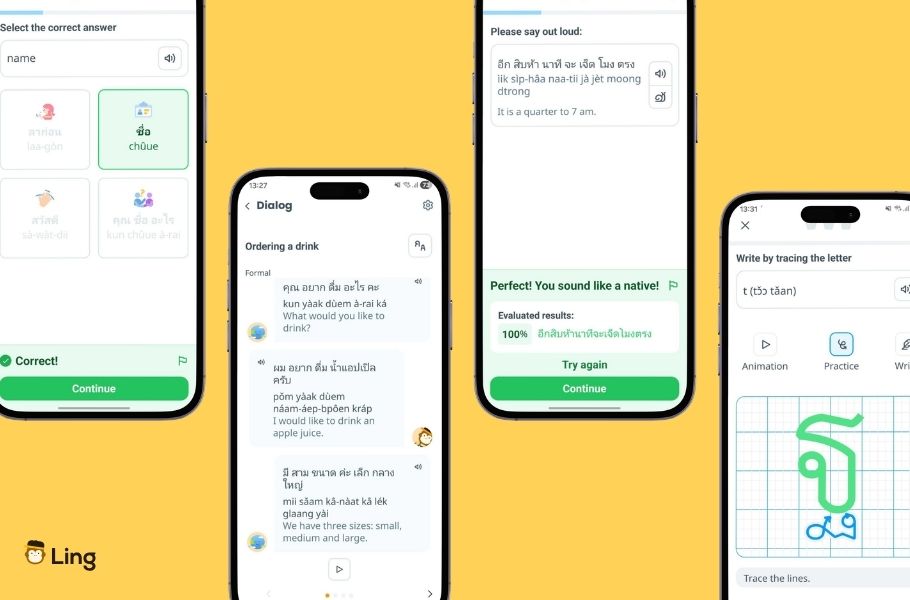
- The speaking lesson records your pronunciation and gives color-coded feedback (red, yellow, green) via speech recognition technology.
- Grammar notes for Thai include explanations of tone rules, and with 164 grammar notes available for the Thai course, there’s significant depth there.
- The Ling AI Tutor (currently available on Android) adds a more direct layer: real-time voice-to-voice conversation practice with tone correction and accuracy scoring. It’s still in beta as of May 2026, but it’s genuinely useful for catching tone errors that you’ve stopped noticing yourself.
What you won’t find is a game that plays five versions of the same syllable and asks you to identify each tone. If that’s what you’re expecting, you’ll want to supplement with a dedicated tones resource. But for building practical speaking habits with correct tonal pronunciation baked in from the start, the approach works.
The Thai Script: Learning To Read From The Start With Ling
Here’s my honest opinion: learning the Thai script early is one of the best investments you can make, and Ling’s writing lessons are a good place to start.
- Each unit includes a writing practice component where you trace Thai characters using stroke-order guidance on a canvas; then handwriting recognition tells you whether you got it right.
- The curriculum is designed to avoid overwhelming you. Characters are introduced in groups across units rather than all at once, which means by the time you’ve worked through the course, you’ve built up your Thai writing knowledge incrementally rather than trying to memorize all 44 consonants in a weekend.
- I actually wish the writing component were a standalone unit I could front-load. Teaching writing at the beginning of the course is ideal when learning a new language, especially if that language has a different script. If I could spend the first two weeks purely on script before touching vocabulary, I would. But the built-in pacing makes sense for most learners.
- If you’re specifically focused on learning the Thai alphabet, Ling covers the foundations well. And once you can read the Thai script, romanization becomes a crutch you no longer need.
- The romanization toggle (showing transliteration alongside the Thai script) is easy to turn off in settings. My recommendation: use it for the first few units, then remove it. That moment of friction is exactly where retention starts to build.
Ling’s Unit Structure And 8 Game Types
Each lesson on Ling uses eight interactive game types in sequence:
- Flashcards introduce the word with audio and an image
- Multiple-choice questions
- Matching games
- Listening skills exercises
- Sentence sorting
- Translations
- The conversation game, which shows a real-life dialogue with fill-in-the-blank participation
A few things stand out in daily use:
- Personally, the flashcards and the conversation game are the ones that stick with me most. The flashcards give new words in context, not in isolation, and the conversation fill-in-the-blank exercises are where vocabulary starts to feel usable in a real exchange. I use the My Vocabulary feature constantly; it lets me save favorite words I haven’t fully retained yet so I can come back to them before I forget.
- And when I want to test what’s actually stuck, Ling gives me two review functions: one for vocabulary and one for full conversations, both accessible from the Review tab. The quiz makes it immediately obvious what I still need more practice on and what I’ve genuinely learned.
- The vocabulary section builds up to 800–1,000 phrases across the full course. This is enough to navigate daily life in Thailand, order food, have a basic conversation with your partner’s family, and not feel completely lost as you wander Thai streets.
Ling’s Grammar Notes, Culture Notes, And What They Add
I love these sections more than I expected to. Thai grammar has a logic to it that isn’t obvious at first, classifiers, particles, formal vs. informal register, and the grammar explanations in the Thai course give you these in clear, practical terms written by native speakers.
- The grammar section inside each unit is where Ling’s language teaching goes deepest for Thai specifically, and I recommend reading them with full attention.
- The culture notes add another layer: why Thais use certain phrases in certain contexts, what’s considered polite, what to avoid. The culture notes also explain when to use formal conversation versus casual speech, a distinction that matters a lot in Thai social contexts.
That cultural context makes the language make sense in a way that pure vocabulary drilling never does. Personally, it’s essential for me to have a deep understanding of a culture before I learn new words. For all Asian languages I’ve studied in the past, this has been a huge part of my learning.
Ling’s Unit Structure: What 50 Units Cover
| Component | What It Covers |
| 4 Vocabulary Lessons | Core words and phrases with native speaker audio, images, and 8 game types |
| Speaking Lesson | Pronunciation practice through a dedicated speaking exercise with real-time speech recognition feedback |
| Writing Lesson | Thai script character tracing with handwriting recognition |
| Grammar Notes | Native-speaker explanations of grammar rules, including tones |
| Culture Notes | Customs, etiquette, and social norms in context |
| Unit Exam | Comprehensive test: 3 mistakes = fail; must retake. Perfect for testing your skills |
The new Ling language-learning journey takes learners from absolute beginner through a structured progression. The updated curriculum is a significant improvement on the earlier version, and one of the things I genuinely enjoy using now.
What Ling Thai Learners Actually Say
Our support team at Ling reads every review that comes in on Google Play and the App Store directly. Not to filter them, but because they’re the fastest way to find out what’s working and what needs to improve. The Ling app has evolved quickly over the past few years, and a lot of that evolution came directly from user feedback turned into product decisions by our developers, content team, and native speakers.
Here’s what we hear consistently from Thai learners:
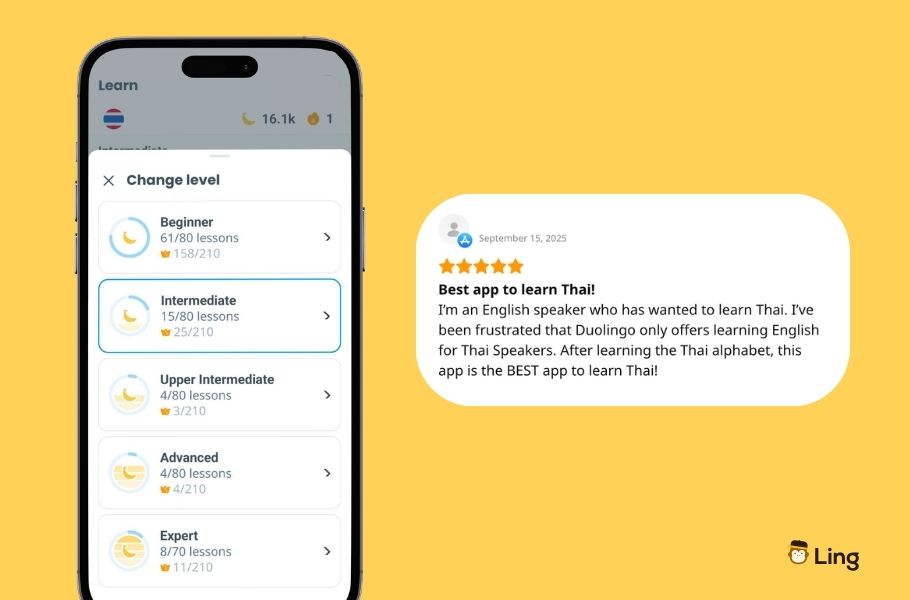
- What people love most: The interactive, mini-game style makes daily practice feel less like studying. One recent Google Play reviewer put it well: after using the app for just a week, they already noticed their pronunciation improving and felt confident with basic conversations. Several users mention that the short lessons (10–15 minutes) are what finally made daily practice stick where longer-form apps didn’t.
- A long-term user wrote in March 2026: “I have used this app for years to help with my Thai speaking and learning. The lessons are short, and the conversational aspect gives you an opportunity to hear spoken Thai and mimic the tone and pace, or slow it down if you prefer.” That’s exactly the behavior that builds real listening comprehension over time.
- Another user shared: “The lessons are well-structured, and the interactive exercises make it so easy to understand pronunciation, tones, and vocabulary. I really like how the app focuses on speaking and real-life conversations, which helps me sound more natural when talking in Thai.” (12 people found this review helpful – which tells you it resonates.)
Where users push back: Two pieces of feedback come up regularly, and I want to be transparent about both.
- First, gendered language. Thai uses different polite particles for men (ครับ – khrap) and women (ค่ะ / คะ – kha), and Ling’s lessons currently emphasize the feminine forms without always explaining the distinction clearly. One reviewer noted: “I am a man and I’m being forced to learn ka instead of kap.” This is a real limitation; our team is aware of it, and it’s on the roadmap for improvement. In the meantime, the grammar notes explain the difference clearly, so use them.
- Second, speech recognition accuracy can frustrate some users, particularly in the numbers section, where the system expects word form (the word “one”) but recognizes a numeral (the digit “1”). These edge cases happen, and while the team actively works to improve them, it’s worth knowing before you hit your first speaking lesson.
The fact that both of these get flagged alongside overwhelmingly positive ratings (4.7 stars on Google Play across 37,000+ reviews) tells you something honest about the app: it’s genuinely useful, and the team takes the friction points seriously. This is why Ling is the leading app for learning Thai.
Ling Thai For Different Learner Types
Not everyone learning Thai is doing it for the same reason. Here’s how Ling fits across the most common scenarios:
| Learner Type | Goal | Ling Fit | Notes |
| Expat living in Thailand | Daily life communication | Strong | 50 practical, themed lessons map directly to everyday situations |
| Traveler visiting Thailand | Basic phrases, survival Thai | Strong | Units 1–10 cover most travel needs |
| Partner/family learner | Connect with Thai-speaking family | Strong | Cultural context + dialog practice built in |
| Heritage learner | Reconnect with language and roots | Good | Script training and culture notes add cultural depth |
| Advanced learner (B2+) | Professional or academic fluency | Limited | Ling targets practical communication; it’s not designed for academic or certification purposes |
| Certification seeker | Official proficiency certificate | Not suitable | Ling does not offer certified testing at the moment |
Practical Tips For Learning Thai With Ling
- Start with the Thai script from Unit 1, not later. The temptation is to skip the writing section and focus on speaking. Learners who engage in the writing lesson early build pattern recognition that makes vocabulary stick faster, and this eventually lets you learn Thai vocabulary without relying on romanization at all.
- Turn off romanization by Unit 10. Use transliteration as a scaffold, not a permanent aid. The toggle is in settings, and removing it forces your brain to read the Thai script, which is where real reading fluency starts.
- Use slow-speed audio for tones. The 0.5x playback isolates each syllable clearly, which is important for distinguishing falling from low tone in the early units.
- Complete the unit exam before moving on. The exam covers all four vocabulary lessons. Skipping it and advancing means you are building on gaps you haven’t closed yet.
- Use saved words actively. Bookmark vocabulary that doesn’t stick immediately and review it before your next session. The Favorites feature is underused but genuinely effective as a personal review tool.
- Pair Ling with immersive practice at home. The app builds your foundation; language immersion at home, such as listening to Thai music, podcasts, or YouTube channels, can accelerate how fast that vocabulary moves from recognition to usage.
- If you want speaking practice beyond the app, the Ling AI Tutor and Ling Live tutors offer two different paths: AI-powered conversation practice for unlimited low-pressure repetition, or 1-on-1 sessions with native Thai tutors if you want real human feedback.
- Download the Ling app for offline use if you commute or travel, the full Thai course downloads approximately 175 MB and works completely offline once saved (Ling Pro feature).
What Ling Thai Honestly Does Not Cover
Ling is transparent about its scope, and this guide should be too. Here is what to keep in mind:
- The app builds practical conversational ability across beginner to advanced levels; though the writing section covers character formation and stroke order, it does not progress to reading comprehension of running Thai text.
- If you want to understand how long it really takes to reach fluency in Thai, the answer depends on how consistently you practice and whether you supplement Ling with real conversation.
- Voice recognition accuracy varies by microphone quality and background noise, and as noted above, some edge cases in the numbers section still need improvement, and the team is actively working on improving this experience.
And one thing worth noting: Ling is not an AI language-learning app in the trendy sense. Our language courses are built by native Thai speakers and language experts. The AI Tutor is one feature within the Thai course; not the foundation of how the app teaches. That’s actually why the content sounds natural and culturally grounded, rather than generic. In the past months, I’ve tested many apps, which as soon as I start the first lesson, I can see are built with AI. Here’s why native-speaker content still beats AI-generated learning, worth reading if you’re comparing options.
FAQ: Ling App Review: The Ling App Thai Course
Is The Ling App Good For Learning Thai?
Yes. Ling was built specifically for Thai, offering 200 lessons with native-speaker audio, Thai script training, grammar notes, culture notes, and real dialog practice across 50 units. If your goal is practical communication, travel, expat life, or connecting with your Thai family, it gives you exactly what you need to start and keep making progress.
Is The Ling App Effective For Learning Thai?
Ling is effective when used consistently. The 10–15 minute daily format builds vocabulary and pronunciation habits gradually, which is how long-term retention actually works. Users who engage with lessons daily and use the grammar and culture notes consistently report noticeable progress within the first few weeks.
What Is The Best App For Learning Thai?
For practical Thai, Ling is the most complete dedicated option available. It was designed specifically for Thai, and the content depth, native-speaker audio, Thai script training, and cultural context go significantly further than retrofitted courses on general platforms. Duolingo does not currently offer Thai.
Does Ling Teach Thai Tones?
Ling teaches Thai tones through native-speaker audio at normal and slow speed, grammar notes explaining tone rules in detail, and speaking lessons with real-time pronunciation feedback. The AI Tutor (Android) adds tone-specific correction during conversation practice. There is no dedicated tones game; tone awareness builds naturally through consistent lesson practice.
How Much Of Ling Thai Is Free?
Ling Thai isn’t free, but you can try it first. Full access to all 50 units, 200 lessons, grammar notes, culture notes, Thai script writing practice, and offline learning requires Ling Pro at $16.99/month or $89.99/year. The annual plan includes a 7-day free trial with full access and no commitment.
Is Ling Better Than Duolingo For Thai?
Duolingo does not currently offer a Thai course. Ling was built specifically for Thai, with 164 grammar notes, 35 culture notes, native Thai speaker audio, full Thai script writing practice, and the AI Tutor for pronunciation feedback. There is no equivalent Thai course on Duolingo to compare it to.
What I’d Tell Anyone Starting With Thai Right Now
Four years living in Thailand. Living around locals with whom I really want to speak in their own language. Moments when I not only want to sit, smile, and nod, but actually speak and connect. That’s why I use this app, and that’s the context from which I’m giving you this Ling learn Thai language review.
- The Ling app is the most complete self-study tool I’ve seen for Thai at the beginner to intermediate level, and building thoroughly for advanced learners as well. Other language-learning apps don’t have the quality, the full scope structure, or the UI and UX that Ling offers. The native-speaker audio, the script training, the grammar and culture notes that give the language actual context, these are not afterthoughts, but the product that helps you learn.
- Whether an app takes you to fluency on its own is on your own opinion, but a complete full-stop app like Ling can definitely help you build a solid, daily-practice foundation that builds real vocabulary, real pronunciation habits, and real cultural understanding.
- And when I’m being really consistent and actually use what I’m learning in Ling, after months of consistent use, I catch words in conversations that I otherwise shouldn’t be able to catch yet. That’s not nothing.
If you haven’t tried it yet, the annual plan at $89.99 comes with a 7-day free trial, full access to every lesson, every feature, no commitment. You’ll know within the first unit whether this is the kind of learning experience that suits you. And my last advice, don’t wait until you’re “ready” to start. I’ve made that mistake before. Just start, and you’ll eventually get there.
Master Thai With Ling Today
Whether you’re moving to Thailand, learning for someone you love, or simply ready to finally make progress with the Thai language, download the Ling app and begin your first lesson today. The annual plan includes a 7-day free trial so you can explore the complete course before committing. Start learning Thai with Ling!